Why Did Shopify Payments Ban My Store? What to Do Next
Shopify Payments can ban, hold or freeze a store for prohibited verticals, high chargebacks or unsupported regions. Here is why it happens, what happens to your funds, and how to keep selling.
Shopify Payments usually bans, holds or freezes a store when it detects a prohibited or high-risk business, a spike in chargebacks or fraud, or an unsupported country or product. Shopify Payments runs on Stripe rules, so the same triggers apply. Your storefront stays live, and you can connect a third-party payment gateway to keep selling.
Why did Shopify Payments ban my store?
Shopify Payments most often bans, suspends or holds a store because the business falls under a prohibited or restricted category, because chargebacks or fraud crossed a risk threshold, or because the store operates in a country, currency or product type Shopify Payments does not support. Approval and continued access depend on underwriting.
Shopify Payments is the built-in processor inside Shopify, and it runs on Stripe's infrastructure and risk rules. That means a store can be fully compliant with Shopify's own merchant terms yet still be declined or shut off at the payments layer, because payment eligibility is a separate underwriting decision. When Shopify Payments flags a store, it may decline the initial application, pause processing pending review, place a hold or reserve on payouts, or close the payments account entirely while the Shopify storefront keeps running. Shopify publishes the categories and conditions it restricts in its terms of service and acceptable use policy, and merchants who fall outside those rules are typically the ones affected.
Common reasons Shopify Payments holds or bans a store
The most common triggers are prohibited or high-risk verticals, a rising chargeback or dispute ratio, suspected fraud or unusual activity, sudden changes in sales volume, mismatched or incomplete business information, and operating from a region or in a currency Shopify Payments does not support. Most fit a short, recurring list.
| Reason category | What Shopify Payments sees | Typical example |
|---|---|---|
| Prohibited or restricted vertical | Business type excluded by policy | Supplements and nutra, subscription or trial offers, telehealth |
| High chargeback or dispute ratio | Disputes above the risk threshold | A run of item not received or fraud disputes |
| Suspected fraud or risk signals | Unusual patterns or flagged data | Card testing, mismatched identity or device signals |
| Sudden volume change | Sharp, unexplained sales spike | A viral product outpacing the underwriting profile |
| Incomplete or mismatched information | Business details that do not verify | Name, tax ID or bank details that do not match |
| Unsupported country or currency | Store outside supported regions | Selling from or into an unsupported market |
What are prohibited and restricted businesses on Shopify Payments?
Prohibited and restricted businesses are the categories Shopify Payments will not underwrite, listed in Shopify's terms and acceptable use policy. They typically include regulated, high-liability or high-chargeback verticals. A store can legally sell these products on a Shopify storefront yet still be blocked from processing card payments through Shopify Payments.
The distinction that trips up many merchants is between selling on Shopify and processing through Shopify Payments. Shopify the storefront platform allows a much broader set of businesses than Shopify Payments the processor will underwrite, because the processor inherits Stripe's risk appetite. Categories that are commonly reported as restricted or prohibited by Shopify Payments and other mainstream processors include supplements and nutraceuticals, subscription and free-trial offers, telehealth, gambling and iGaming, crypto, and various regulated or high-chargeback verticals. If your product is in a category that Shopify Payments will not underwrite, the fix is usually not appealing the storefront ban, it is moving card processing to a third-party payment gateway that underwrites your specific category on purpose.
What happens to your funds and payouts after a ban
When Shopify Payments bans or suspends a store, the storefront usually stays online, but card processing through Shopify Payments stops. Existing balances may be paid out on the normal schedule, held, or placed in a reserve while Shopify reviews the account, and pending disputes still follow the card networks' timelines regardless of the ban.
The practical impact separates into two layers. First, the storefront: your Shopify store, products, customers and admin dashboard generally remain intact, so you do not lose the business, only the ability to take cards through Shopify Payments. Second, the money: Shopify follows its own payout and reserve policy for held funds, which can mean a delay, a rolling reserve, or a review period before remaining balances are released. Open chargebacks do not disappear when payments are shut off, the acquirer and card network still resolve them under their reason codes and deadlines. Because of this, the fastest way to protect cash flow is to restore processing through an alternative gateway while the Shopify Payments balance works through its cycle.
What to do next after a Shopify Payments ban
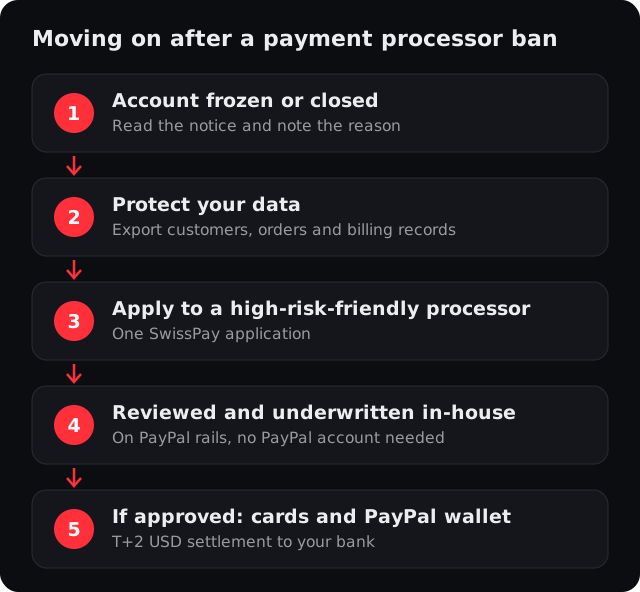
Do these first: read the notice to identify the exact reason, check your email and Shopify admin for any required documents, and respond if Shopify offers an appeal. In parallel, set up a third-party payment gateway so your Shopify checkout keeps taking cards while the Shopify Payments account is resolved.
- 1Find the stated reason
Read the Shopify notice and admin messages to confirm whether it is a vertical restriction, a chargeback or fraud flag, or a verification gap.
- 2Provide any requested documents
If the flag is verification or volume, supplying business, identity or shipping evidence can sometimes reopen access.
- 3Preserve dispute evidence
Keep proof of delivery, AVS and CVV results, 3-D Secure authentication and customer authorizations for any open chargebacks.
- 4Fix the underlying trigger
If chargebacks caused the ban, tighten fraud screening and your billing descriptor so the same problem does not follow you to the next processor.
- 5Connect a third-party gateway
For a restricted vertical or a permanent ban, move card processing to a provider that underwrites your category, so your Shopify store keeps selling.
How to keep selling with a third-party gateway
If Shopify Payments will not process your store, you can connect a third-party payment gateway to keep your Shopify checkout live. The gateway processes the card payment and settles funds to you, while your Shopify storefront and dashboard stay the same. This is the standard path for stores in restricted verticals or recovering from a ban.
Shopify supports connecting an approved third-party payment provider from the store's payment settings, instead of, or alongside, Shopify Payments. Shopify may apply a third-party transaction fee when a store does not use Shopify Payments, so check your current plan's terms.
For US and Canadian stores in its supported verticals, SwissPay.ai is one such third-party provider. SwissPay is a PayPal-managed payment facilitator, operated by MintAds Inc., that reviews and underwrites merchants in-house and processes on PayPal rails, so you can accept card and PayPal-wallet payments without needing your own PayPal account. Payments are processed on PayPal, one of the most established payment networks on the internet. SwissPay connects to Shopify through a Shopify plugin, so your storefront, products and admin dashboard stay the same while card processing moves to SwissPay. It is built for subscription, trial and rebill businesses in its supported verticals, including nutraceuticals and supplements, health and wellness subscriptions, telehealth and GLP-1 via a licensed pharmacy, crypto, and skincare and beauty, and it pairs each account with real-time fraud scoring using address (AVS), device and risk signals, 3-D Secure 2 where required, and chargeback and PayPal dispute handling with automated evidence submission. SwissPay does not accept every business and does not guarantee approval, so the fit for your category is confirmed during onboarding.
Banned or held by Shopify Payments?
If you run a supported business such as supplements, subscriptions, telehealth or crypto, see how SwissPay works as a Shopify payment gateway on PayPal rails, or read the Stripe account suspended rescue guide, since Shopify Payments runs on Stripe. Approval depends on your business and category; there is no guaranteed approval.
Apply for a merchant accountRelated
Frequently asked questions
Why did Shopify Payments ban my store?
Does a Shopify Payments ban shut down my whole store?
What happens to my money if Shopify Payments freezes or holds funds?
What businesses are prohibited on Shopify Payments?
Can I still sell on Shopify after Shopify Payments bans me?
What are the best Shopify Payments alternatives after a ban?
Apply for a merchant account
Tell us about your business. One application, boarded and underwritten in-house on PayPal rails, with card and PayPal-wallet processing built for subscriptions.
- Boarded and underwritten in-house, no separate PayPal account needed
- Card and PayPal-wallet vaulting for subscriptions, trials and rebills
- PCI DSS Level 1, 3-D Secure 2 where required, and chargeback and dispute handling built in