Can I Use a Third-Party Payment Provider on Shopify?
Yes. Shopify lets you connect a third-party payment provider instead of, or alongside, Shopify Payments. Here is how it works, what it costs, and how to add one to your store.
Yes. Shopify lets you connect a third-party payment provider instead of, or alongside, Shopify Payments. You enable it in your store's payment settings, and that provider then processes each card payment and settles the funds to you. This is how merchants who cannot use Shopify Payments, or simply want an alternative, keep taking cards.
Can you use a third-party payment provider on Shopify?
Yes, you can use a third-party payment provider on Shopify. Shopify is an open platform that lets merchants connect an approved external provider in place of, or in addition to, Shopify Payments. Once connected, that provider authorizes and processes each card payment and settles the funds to the merchant's account.
Shopify Payments, which is powered by Stripe, is the default processor built into the platform, but it is not the only option. Shopify supports a long list of external providers so that merchants in different countries, currencies and product categories can still accept cards. You choose a provider, connect it from the store's payment settings, and your checkout runs through that provider instead of the built-in one. This flexibility is exactly why merchants who are declined, banned, geo-blocked or simply dissatisfied with Shopify Payments can keep their storefront and swap only the processor underneath it. SwissPay operates as one such third-party payment provider for Shopify stores, connecting through its own Shopify plugin and processing card payments on PayPal rails.
What is a third-party payment provider on Shopify?
A third-party payment provider is any card processor other than Shopify Payments that you connect to your Shopify checkout. It handles authorization, processing and settlement of card transactions on your behalf, while your Shopify storefront, catalog, cart and admin dashboard stay exactly as they are.
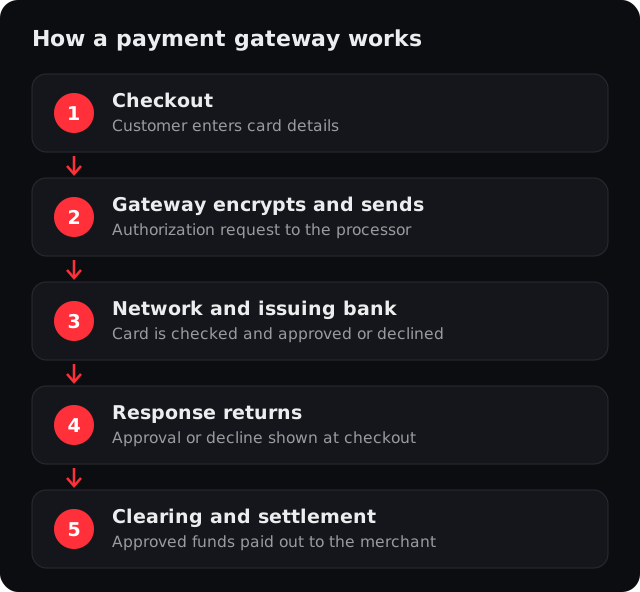
In Shopify's own terms, these are third-party providers, and the platform lists many of them by region. The provider sits behind your checkout: the shopper still buys on your Shopify store, but the card data is passed to the external provider, which talks to the card networks and the acquiring bank, then returns an approval or decline. A gateway like SwissPay works this way, connecting as a third-party payment provider through its Shopify plugin and processing your volume on PayPal rails. As a PayPal-managed payment facilitator, SwissPay reviews and underwrites your business in-house, so you do not need your own PayPal account. The merchant keeps one storefront and swaps only the engine that moves the money.
How is a third-party provider different from Shopify Payments?
Shopify Payments is the processor built into Shopify and powered by Stripe, so it is the default with no separate signup. A third-party provider is an external processor you connect yourself. The trade-off is that Shopify applies its own transaction fee when you do not use Shopify Payments.
| Shopify Payments | Third-party provider | |
|---|---|---|
| What it is | Native processor built into Shopify | External processor you connect yourself |
| Powered by | Stripe | Usually the provider's own acquirer; for SwissPay, PayPal's managed payment-facilitator path |
| Setup | On by default, no separate signup | You enable and connect it in payment settings |
| Underwriting | Inherits Stripe's rules and restricted list | The provider underwrites your category directly |
| Country and currency reach | Limited to supported regions | Depends on the provider (often broader) |
| High-risk verticals | Largely restricted | Supported by specialist providers |
| Shopify third-party transaction fee | Not applied | Applies when not using Shopify Payments (set by Shopify) |
| Storefront and admin | Unchanged | Unchanged |
| Best for | Standard, supported stores | Declined, banned, geo-blocked, high-risk, or alternative-seeking stores |
Is there a fee for using a third-party provider on Shopify?
Shopify has a published policy of charging a third-party transaction fee to stores that use an external provider instead of Shopify Payments, on top of the provider's own processing rate. The exact percentage depends on your Shopify plan and can change, so check your current plan's terms.
The fee exists because Shopify Payments is how the platform earns on processing, so it applies a separate charge when a store routes card volume elsewhere. This is a Shopify policy, not a charge from the third-party provider, and it is typically tiered so that higher Shopify plans carry a lower rate. Two points matter for a decision. First, the fee is set by Shopify and is described generically here on purpose, because the precise number depends on your plan and can change, so confirm it against Shopify's current terms rather than quoting it from memory. Second, for many merchants the third-party fee is far cheaper than the alternative of not processing at all, which is the real situation when Shopify Payments has declined or closed the account. The Shopify-side third-party fee is separate from and set by Shopify, not by SwissPay.
How do you add a third-party payment provider to Shopify?
At a high level, you add a third-party provider from your Shopify admin's payment settings, choose the provider, enter the credentials it gives you, and enable it for checkout. The exact path depends on your provider and Shopify plan, so confirm the specific steps with your provider during onboarding.
- 1Choose a provider that fits your business
Match on country, currency, and whether the provider underwrites your product category.
- 2Apply and get approved by the provider
The provider reviews your business and, if approved, gives you the connection credentials.
- 3Connect it in Shopify's payment settings
In the Shopify admin, add the third-party provider and enter the credentials it supplied.
- 4Test and enable checkout
Confirm a test transaction settles, then turn the provider on for live checkout. With SwissPay, once your business is approved, you install the SwissPay Shopify plugin and enable it, and card payments then process on PayPal rails.
When does a merchant need a third-party provider instead of Shopify Payments?
A merchant needs a third-party provider when Shopify Payments will not work for the store, or when the merchant wants an alternative. That covers stores declined, banned or frozen by Shopify Payments, stores in restricted high-risk verticals, and healthy stores that want better rates, smart routing, or a backup processor.
Shopify Payments inherits Stripe's underwriting, so it declines or closes many legal businesses: restricted categories such as nutraceuticals and supplements, subscription and rebill billing, telehealth and GLP-1 prescriptions, crypto and iGaming, and skincare and beauty, plus stores flagged by an automated review for chargebacks or account history. A ban does not take down your storefront, but it does stop card processing until you connect another provider. Other merchants are approved yet still switch, for lower rates, for a specialist provider that understands their category, or for a redundant second processor so a single review cannot take checkout offline.
For US and Canadian stores in its supported verticals, SwissPay.ai is one such third-party provider. As a PayPal-managed payment facilitator, SwissPay connects as a third-party payment provider on Shopify through its own Shopify plugin and processes card volume on PayPal rails, reviewing and underwriting your business in-house so you do not need your own PayPal account. It is built for supported verticals such as nutraceuticals and supplements, subscriptions and rebills, telehealth and GLP-1 via a licensed pharmacy, crypto, and skincare and beauty, with card and wallet vaulting for recurring billing, real-time fraud scoring using address (AVS), device and risk signals, and 3-D Secure 2 where required. If Shopify Payments has already declined or closed you, a specialist third-party provider is the usual next step. There is no guaranteed approval; the outcome depends on underwriting.
Need to keep taking cards on Shopify when Shopify Payments will not?
See how SwissPay works as a third-party payment gateway for Shopify and as a Stripe alternative. Approval depends on your business; there is no guaranteed approval.
Apply for a merchant accountRelated
Frequently asked questions
Can I use a third-party payment provider on Shopify?
What is a third-party payment provider on Shopify?
How is a third-party provider different from Shopify Payments?
Does Shopify charge a fee for using a third-party provider?
How do I add a third-party payment provider to Shopify?
When should I use a third-party provider instead of Shopify Payments?
Apply for a merchant account
Tell us about your business. One application, boarded and underwritten in-house on PayPal rails, with card and PayPal-wallet processing built for subscriptions.
- Boarded and underwritten in-house, no separate PayPal account needed
- Card and PayPal-wallet vaulting for subscriptions, trials and rebills
- PCI DSS Level 1, 3-D Secure 2 where required, and chargeback and dispute handling built in